Product
Three surfaces, and the edges of each.
Collimate is a sub-merchant portal, an admin panel for the team that runs them, and the onboarding flow that connects both to Adyen. What follows is each in turn, including what it does not do.
01 / Sub-merchants
Earnings, payouts, and why verification is stuck.
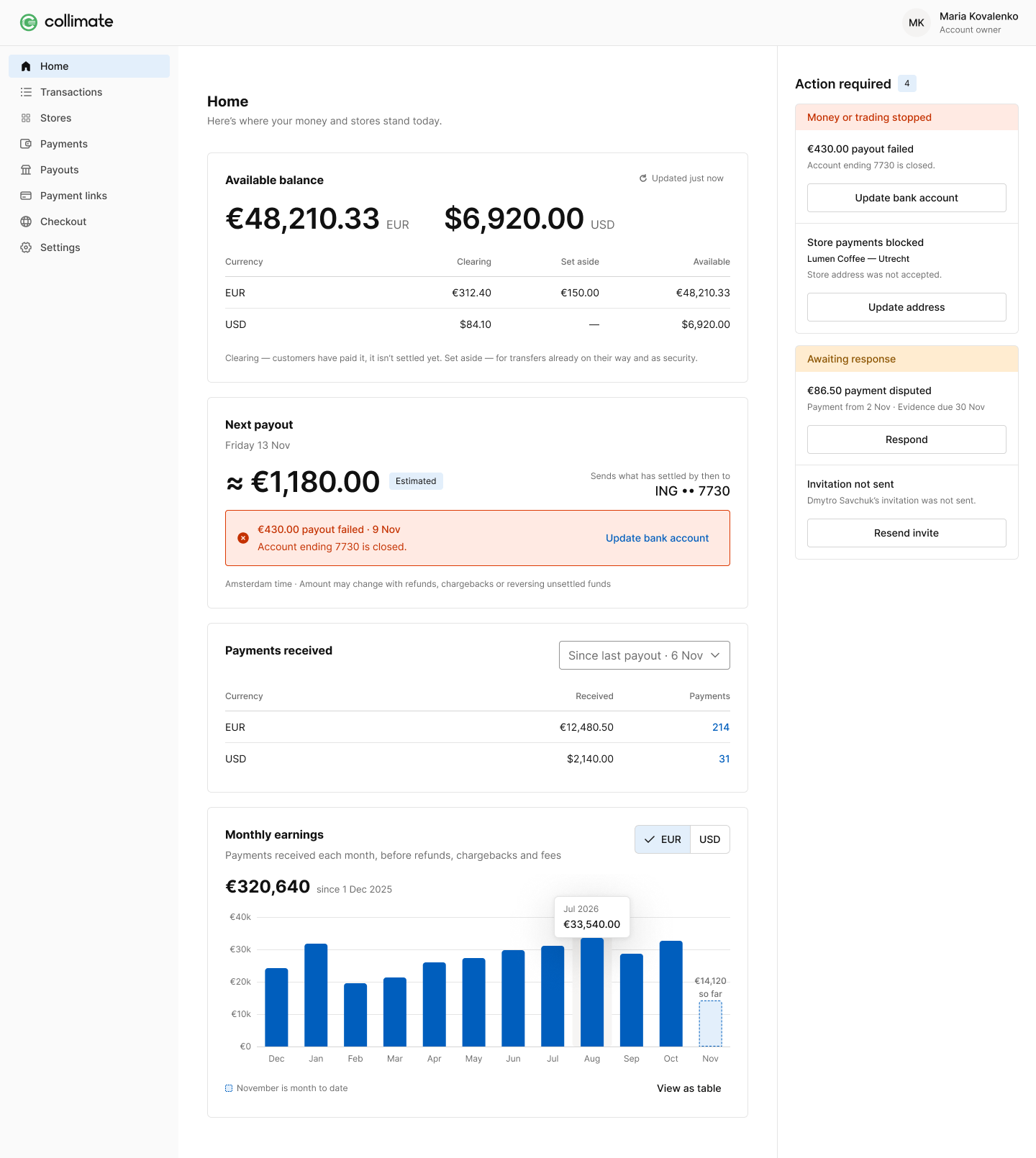
Two people use this surface: the owner-operator who wants one number in ten seconds, and the finance user who has to reconcile to the cent. The default is the first, with the second's detail exactly one deliberate click deeper.
Earnings after fees
Not gross volume. The figure a seller actually asks about is what landed after deductions, and every deduction is explained rather than netted off silently.
Payout visibility
When money arrives, where it is going, and which transactions make up the batch. Payout initiation, the payout account and the schedule all sit here, so "where’s my money" stops being an email to your team.
Verification status with a reason
Adyen decides whether a sub-merchant is verified. Collimate surfaces that decision with enough detail to act on: what is outstanding, and what to do next. A status without a reason is just a support ticket in waiting.
 123
123 123
123- Earnings after fees. The number the owner-operator actually wants, not gross volume.
- Next payout. Date and amount, so “when does my money arrive” stops being an email.
- Status with a reason. Every status carries why it happened and what to do next.
Questions
- Can a sub-merchant see another sub-merchant's data?
- No. Every record is scoped to its tenant and its sub-merchant, and that scoping is enforced in the application and guarded by a test that keeps the cross-tenant access path in exactly one audited place.
- Does the portal work on a phone?
- Yes. Browser support is current Chrome, Firefox and Safari.
02 / Your team
Invite, watch the pipeline, unblock.
This is the surface your operations lead lives in. It exists so that the answer to "why is this seller stuck" is on screen rather than in a support thread with Adyen.
Invite in under a minute
Onboarding is invite-only by design — company, contact, email, send. That gate is deliberate pre-screening, not a missing feature: it means nobody starts an application you did not intend to accept.
The pipeline at a glance
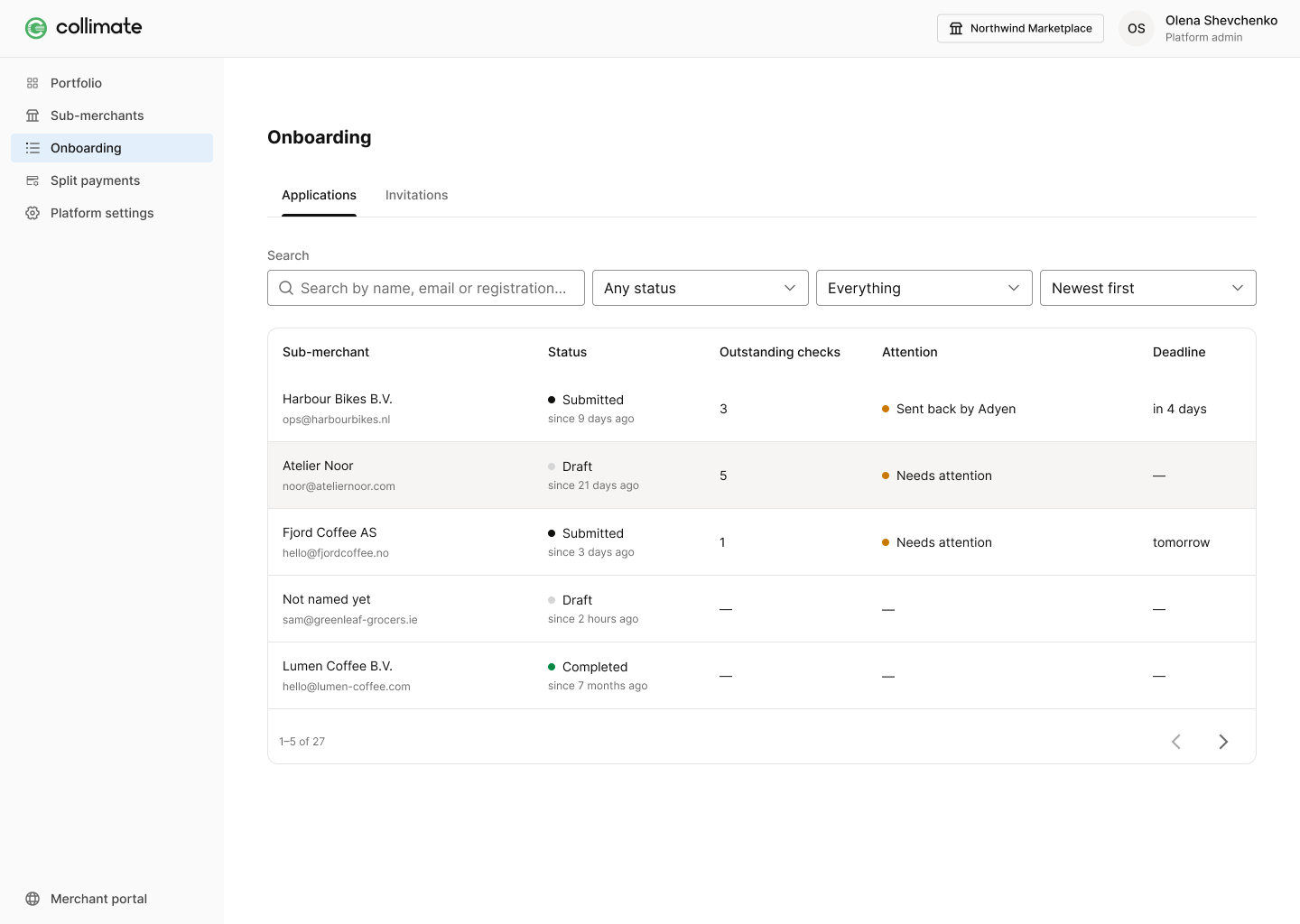
Invited, in progress, verified, stuck. A platform with hundreds of sellers needs the count and the exceptions, not a list to scroll.
Diagnosing a stuck application
The Adyen status, the reason behind it, and what is outstanding — surfaced on the row. Your team acts on it directly instead of raising a ticket and waiting.
Per-tenant configuration
Which modules your sellers get is a policy choice, set per tenant when we provision it. Changing it does not require a release of your own.
 12341234
- Invited. Onboarding opens only after your team sends an invite — a deliberate pre-screen.
- In progress. The seller is filling in Adyen's legal-entity form, mirrored one to one.
- Verified. Adyen has made the decision and granted capabilities; we surface the result.
- Needs attention. The reason is on the row, so your team can act without opening a ticket.
Questions
- Does Collimate hold our Adyen credentials?
- No. Credentials are configured, updated and revoked through the panel, and Collimate does not hold them itself. Test and production stay separated.
- Can we restrict who is allowed to be invited?
- Yes — restrictions are a per-tenant policy applied before an application reaches Adyen, which is usually where a compliance team wants the control to sit.
03 / White-label
Your brand, your subdomain.
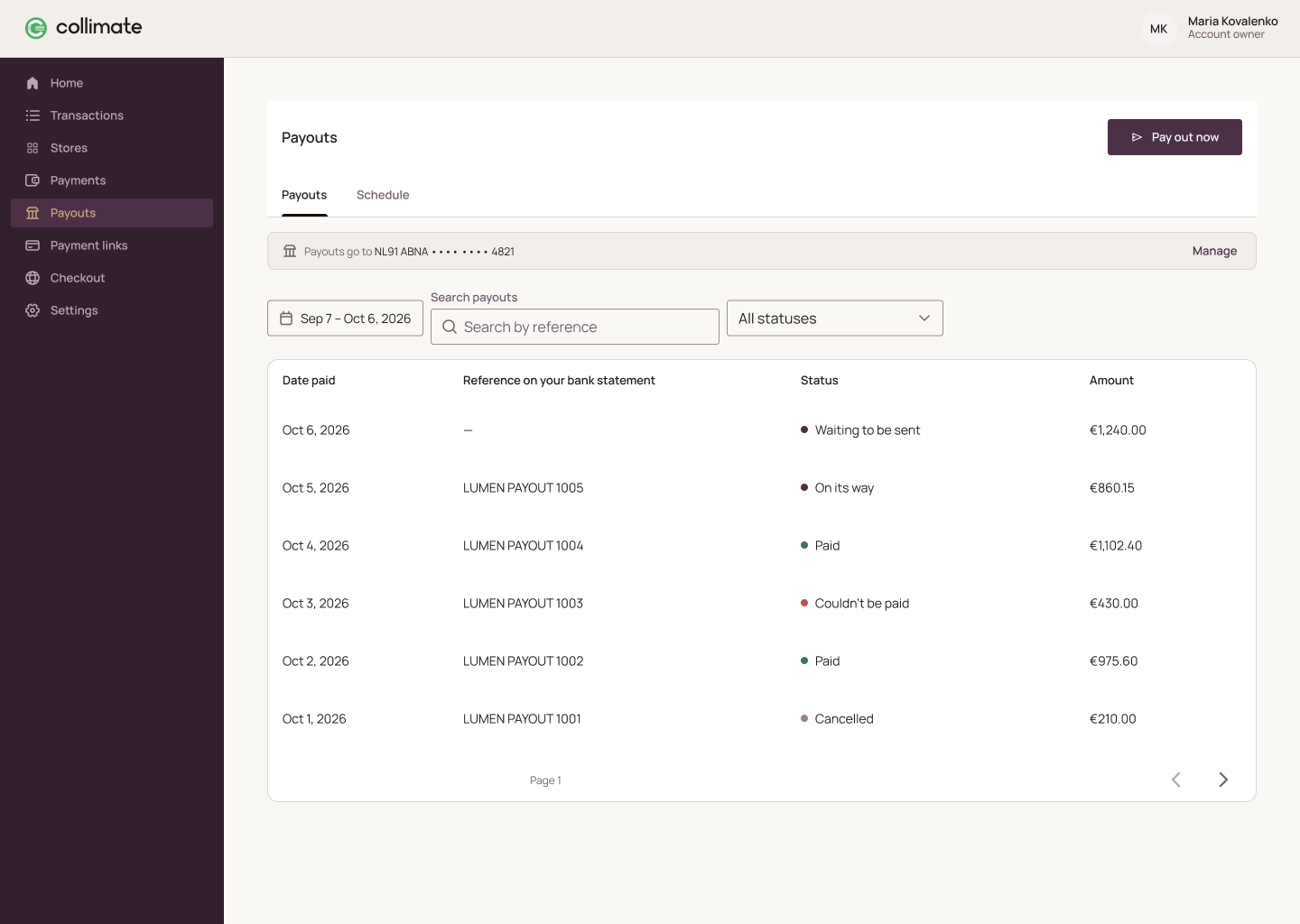
Your sellers sign in to something that looks like you. Branding, theme and domain are configured when your tenant is provisioned — you never build or maintain a portal variant of your own.
Your brand
Logo, palette and type applied to the portal as per-tenant styling on a shared codebase. No fork, which means product improvements reach you without a migration.
A dedicated subdomain
Each tenant is served on its own host, configured by us at setup. Tenant-managed custom domains are the target model and are not part of the first release.
Styled sign-in
The sub-merchant sign-in carries your branding, so the seller never lands on a page that looks like somebody else's product.
Configured, not self-service
We set up the instance. That is deliberate: it keeps your team out of a theming tool and keeps every tenant on one maintained codebase.
 11
11- Your brand. Logo, palette and type, configured by us when your tenant is provisioned.
- Your domain.
Questions
- Can we use our own domain?
- Tenant-managed custom domains are the target model, and are not in the first release. Today each tenant runs on a dedicated subdomain we configure.
- Who maintains the theming?
- We do. Branding is configuration on a shared codebase, so there is no bespoke branch of the product carrying your name.
Next step
Bring every sub-merchant into focus.
We are taking on a small number of design partners: platforms on Adyen for Platforms who want a say in what gets built, direct access to the team building it, and early pricing.